-
7.[Andorid]ConstraintLayout 개념Android 2019. 8. 12. 20:26반응형
ConstraintLayout은 android.view.ViewGroup으로, 위젯을 유연한 방식으로 배치하고 크기를 조정할 수 있습니다.
ConstraintLayout에 View를 추가하기 위해서는 제약조건을 설정해주어야 합니다.
layout_constraintStart_toEndOf View의 시작 사이드를 대상 View의 끝 사이드에 맞춘다. layout_constraintStart_toStartOf View의 시작 사이드를 대상 View의 시작 사이드에 맞춘다. layout_constraintEnd_toStartOf View의 끝 사이드를 대상 View의 시작 사이드에 맞춘다. layout_constraintEnd_toEndOf View의 끝 사이드를 대상 View의 끝 사이드에 맞춘다. layout_constraintTop_toTopOf View의 위쪽 사이드를 대상 View의 위쪽 사이드에 맞춘다. layout_constraintTop_toBottomOf View의 위쪽 사이드를 대상 View의 아래쪽 사이드에 맞춘다. layout_constraintBottom_toTopOf View의 아래쪽 사이드를 대상 View의 위쪽 사이드에 맞춘다. layout_constraintLeft_toLeftOf View의 왼쪽 사이드를 대상 View의 왼쪽 사이드에 맞춘다. layout_constraintLeft_toRightOf View의 왼쪽 사이드를 대상 View의 오른쪽 사이드에 맞춘다. layout_constraintRight_toLeftOf View의 오른쪽 사이드를 대상 View의 왼쪽 사이드에 맞춘다. layout_constraintRight_toRightOf View의 오른쪽 사이드를 대상 View의 오른쪽 사이드에 맞춘다. layout_constraintBottom_toBottomOf View의 아래쪽 사이드를 대상 View의 아래쪽 사이드에 맞춘다. 위에 방식으로 제약조건을 걸게 되는데 layout_constraintStart_toEndOf를 살펴보면
constraintStart(자기 자신의 시작 사이드)를 toEndOf(지정된 View의 끝 사이드)에 맞추라는 뜻입니다.
<TextView
        android:id="@+id/tv_text1"
        android:layout_width="wrap_content"
        android:layout_height="wrap_content"
        android:background="#0F0"
        android:text="text1"
        android:textSize="24dp"
        app:layout_constraintEnd_toStartOf="@id/tv_text2"
        app:layout_constraintTop_toTopOf="parent" />

    <TextView
        android:id="@+id/tv_text2"
        android:layout_width="wrap_content"
        android:layout_height="wrap_content"
        android:background="#0FF"
        android:text="text2"
        android:textSize="24dp"
        app:layout_constraintStart_toEndOf="@id/tv_text1"
        app:layout_constraintTop_toTopOf="parent" />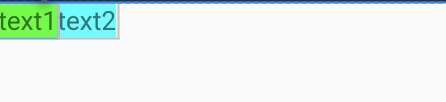
예시로 위에 text1을 보면 위쪽 사이드를 parent에 맞추고 끝 사이드를 text2의 시작 사이드에 맞추라는 뜻입니다.
text2는 위쪽 사이드를 parent에 맞추고 시작 사이드를 text1의 끝 사이드에 맞추라는 뜻이 됩니다.

제약 조건을 위쪽, 시작, 끝을 parent를 줬더니 맨 위 가운데에 정렬이 되었습니다.
하지만 저희는 텍스트를 왼쪽으로 조금 움직이고 싶은데 제약이 걸려있어서 움직여지지가 않습니다.
이럴 때 사용할 수 있는 속성이 app:layout_constraintHorizontal_bias와
0.5를 default값으로 보다 작으면 왼쪽 크면 오른쪽으로 움직입니다.
Vertical 같은 경우에는 0.5를 default값으로 작으면 위쪽 크면 아래쪽으로 이동합니다.
<TextView
        android:id="@+id/tv_text1"
        android:layout_width="wrap_content"
        android:layout_height="wrap_content"
        android:background="#0F0"
        android:text="text1"
        android:textSize="24sp"
        app:layout_constraintEnd_toEndOf="parent"
        app:layout_constraintHorizontal_bias="0.2"
        app:layout_constraintStart_toStartOf="parent"
        app:layout_constraintTop_toTopOf="parent" />
constraintHorizontal_bias 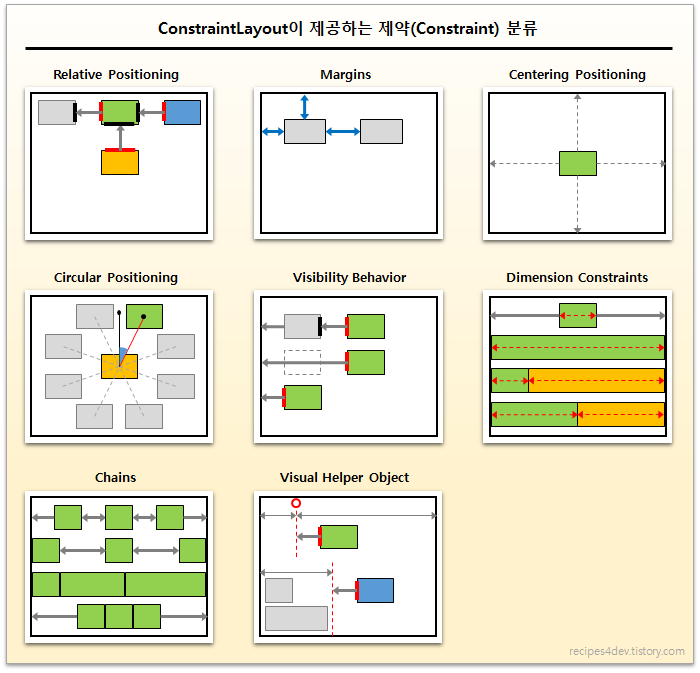
https://recipes4dev.tistory.com/158 위에 그림을 보시면 제약 분류가 여러 가지 존재합니다.
하나씩 알아보도록 하겠습니다.
반응형'Android' 카테고리의 다른 글
9.[Andorid]ConstraintLayout (Circular positioning) (0) 2019.08.14 8.[Andorid]ConstraintLayout (Margins) (0) 2019.08.13 6.[Android]EditText ( hint / inputType ) (0) 2019.08.08 5.[Android]EditView ( imeOptions ) (0) 2019.08.07 4.[Android]TextView ( ellipsize / lines / lineSpacingExtra ) (0) 2019.08.07